I overclocked my comp a few months back. After a while, my graphic card had some trouble. I uncloaked everything. The problem still persists. I decided to open my computer to have a look. It turns out, my graphic card has a substance covering a good part of it, it's very similar to tar. I believe it formed by the dust and the heat generated by the overclocked processor, then dripped on the graphic card.
I tapped some of it off, but I gotta ask, how can I clean it off completely? How does one clean tar off a graphic card? lol... thanks in advance.
Computer help
-
Maximvs

- Posts: 281
- Joined: Sun May 17, 2009 3:45 pm
Computer help
MmmmMMMMmmm, tasty humanz, hmmmmMMM!!!
-
AlwaysSummer Day
- Recognized Donor
- Posts: 1170
- Joined: Sun Jun 24, 2012 11:27 pm
- Location: Detroit, Michigan
Re: Computer help
Iirc nail polish remover will work but I wouldn't recommend it. You are in a very precarious situation. I would check core temps and make sure the fan is running well. An air hose will clean superficial debris but scrubbing "tar" with acetone might break it.
Roland; svirfneblin fist of the forest and eco terrorist.
Heinrich Von Rittermark; Everwatch Knights of Helm
Frederick Von Rittermark; Paladin of Azuth/Mystra
Erik Von Rittermark; Unknown
Heinrich Von Rittermark; Everwatch Knights of Helm
Frederick Von Rittermark; Paladin of Azuth/Mystra
Erik Von Rittermark; Unknown
-
Aspect of Sorrow

- Custom Content
- Posts: 2688
- Joined: Fri Mar 28, 2014 7:11 pm
- Location: Reliquary
Re: Computer help
AlwaysSummer Day wrote:scrubbing "tar" with acetone might break it.
-
Maximvs
- Posts: 281
- Joined: Sun May 17, 2009 3:45 pm
Re: Computer help
Euh, break the tar or the graphic card? lol.
MmmmMMMMmmm, tasty humanz, hmmmmMMM!!!
-
kellendril
- Posts: 992
- Joined: Sun Nov 07, 2010 7:53 am
Re: Computer help
Foam or cotton swabs wetted with rubbing alcohol are safe for use on computer components. Foam is best. Take the card out and carefully swab it clean.
Eowiel Le'liana - Formerly Respected Councilor/Citizen of Doron Amar, now Disrespected Free Agent
Merry Angalagaleil - Strongheart Halfling Sacred Fist
Merry Angalagaleil - Strongheart Halfling Sacred Fist
-
kellendril
- Posts: 992
- Joined: Sun Nov 07, 2010 7:53 am
Re: Computer help
Oh, and whatever you do, DO NOT use a vacuum cleaner inside your computer case. Static electricity basically pours off of the nozzle.
Eowiel Le'liana - Formerly Respected Councilor/Citizen of Doron Amar, now Disrespected Free Agent
Merry Angalagaleil - Strongheart Halfling Sacred Fist
Merry Angalagaleil - Strongheart Halfling Sacred Fist
-
Aspect of Sorrow
- Custom Content
- Posts: 2688
- Joined: Fri Mar 28, 2014 7:11 pm
- Location: Reliquary
Re: Computer help
Not to mention fans are DC connected. They will generate back fed electricity into the board when spun even when the system's off.kellendril wrote:Oh, and whatever you do, DO NOT use a vacuum cleaner inside your computer case. Static electricity basically pours off of the nozzle.
-
kellendril
- Posts: 992
- Joined: Sun Nov 07, 2010 7:53 am
Re: Computer help
Oh, also..while we are at it..make sure you touch a metal part of the case before you touch the motherboard or anything else with a circuit inside..unplug the power cord too..
Of course, this assumed you don't already know all of this. If you do, disregard helpful comments!
Of course, this assumed you don't already know all of this. If you do, disregard helpful comments!
Eowiel Le'liana - Formerly Respected Councilor/Citizen of Doron Amar, now Disrespected Free Agent
Merry Angalagaleil - Strongheart Halfling Sacred Fist
Merry Angalagaleil - Strongheart Halfling Sacred Fist
-
Touri

- Posts: 1104
- Joined: Tue Aug 10, 2010 1:43 pm
- Location: GMT +1
Re: Computer help
Hello Maximvs,Maximvs wrote: After a while, my graphic card had some trouble. I uncloaked everything. The problem still persists.
it sound to me like your graphic card is already damaged. I supose you have small pixel on the monitor. You can try to clean it, but probably it will get worse with time.
You can use Compressed air spray, ideal to eliminate dust from television, cameras, keyboards, computers, machines of precision.
It loooks like that.
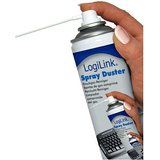
Kind regards
Touri
-
Flasmix

- Posts: 2504
- Joined: Mon Jun 29, 2009 9:22 am
- Location: Cult of Skebbeton HQ
Re: Computer help
Tar?... ...
If it helps, I would suspect it to be melted thermal paste that may have dripped off the overclocked CPU.
If that's the case, you can safely remove it with regular 90% or 100% isopropyl alcohol and not damage anything (further, I am unaware if damage is already in place). If my suspicions are true, you will need to re-apply some thermal paste to your CPU. Thermal Paste/Grease is supposed to melt but I'm thinking too much may have been applied originally or the CPU reached too high of a temperature and it was low quality paste.
Can you double check with the location of your CPU vs. the drip location on the Graphics Card?
If it helps, I would suspect it to be melted thermal paste that may have dripped off the overclocked CPU.
If that's the case, you can safely remove it with regular 90% or 100% isopropyl alcohol and not damage anything (further, I am unaware if damage is already in place). If my suspicions are true, you will need to re-apply some thermal paste to your CPU. Thermal Paste/Grease is supposed to melt but I'm thinking too much may have been applied originally or the CPU reached too high of a temperature and it was low quality paste.
Can you double check with the location of your CPU vs. the drip location on the Graphics Card?
Wirg to Pug: "Iz lat dun?"
Pugratix to a snarky militia man: "Mmmm. Not yet. I will live for hundreds of years and be heralded as one of the greatest forces of destruction on the face of the world. The only thing you can destroy is the outhouse."
Pugratix to a snarky militia man: "Mmmm. Not yet. I will live for hundreds of years and be heralded as one of the greatest forces of destruction on the face of the world. The only thing you can destroy is the outhouse."
-
AlwaysSummer Day
- Recognized Donor
- Posts: 1170
- Joined: Sun Jun 24, 2012 11:27 pm
- Location: Detroit, Michigan
Re: Computer help
Rubbing alcohal might remove burned thermal paste but it isn't going to impress tar much. Hopefully that is indeed the issue.
Roland; svirfneblin fist of the forest and eco terrorist.
Heinrich Von Rittermark; Everwatch Knights of Helm
Frederick Von Rittermark; Paladin of Azuth/Mystra
Erik Von Rittermark; Unknown
Heinrich Von Rittermark; Everwatch Knights of Helm
Frederick Von Rittermark; Paladin of Azuth/Mystra
Erik Von Rittermark; Unknown
-
kellendril
- Posts: 992
- Joined: Sun Nov 07, 2010 7:53 am
Re: Computer help
Tar indicates a burnt resin of some sort..how would that get in a computer case?
Eowiel Le'liana - Formerly Respected Councilor/Citizen of Doron Amar, now Disrespected Free Agent
Merry Angalagaleil - Strongheart Halfling Sacred Fist
Merry Angalagaleil - Strongheart Halfling Sacred Fist
-
Maximvs
- Posts: 281
- Joined: Sun May 17, 2009 3:45 pm
Re: Computer help
No it wasn't the termal paste, I'm pretty sure it was the dust stuck in my large heat distributor of my cpu that melted and dripped down when I overclocked it, which got it to pretty high temperature levels.
As above poster said, compressed air cans help. Do it before any overclocking lol. It covered about half of my card and was about 1 milimeter thick. I'm surprised the card still works at all. >.> Then again, I hear you can dump a whole computer in oil np.
As above poster said, compressed air cans help. Do it before any overclocking lol. It covered about half of my card and was about 1 milimeter thick. I'm surprised the card still works at all. >.> Then again, I hear you can dump a whole computer in oil np.
MmmmMMMMmmm, tasty humanz, hmmmmMMM!!!